LOB message generation (1): A building block for market world models
To understand how LOB message generation can support a market world model, we first look at how orders and messages shape the order book.
Market microstructure: Orders, messages, and the LOB#
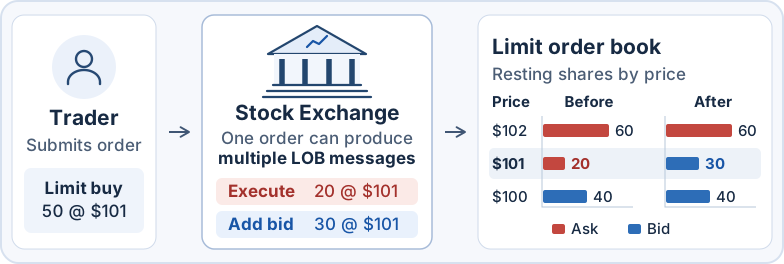
- A trader submits a limit buy for 50 shares at $101.
- The exchange matches 20 shares against an existing sell order at $101 and records an
executemessage. It adds the remaining 30 shares to the book as a new buy order and records anaddmessage. - The highest buy price in the book rises from $100 to $101, while the lowest sell price rises from $101 to $102.
We now describe the process illustrated above more precisely by defining orders, messages, and the limit order book. An order is
where add or cancel, and buy or sell.
As the exchange processes orders, events such as additions, cancellations, and executions are recorded as messages. We refer to these order-level records as LOB messages, available through LOBSTER ↗’s message files and Databento ↗’s market-by-order (MBO) data:
where add, cancel, or execute. The
The limit order book (LOB) contains outstanding orders and their remaining quantities. Each message updates this book according to the exchange’s rules:
LOB message generation as a market world model#
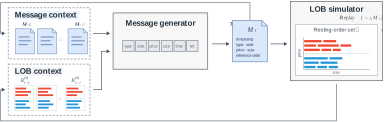
A LOB message generator and a LOB simulator form a closed loop for market simulation.
- Generate a message. Given the history of messages and LOB states,
generates the next message. - Update the book and history. Apply the message to the LOB and append the message and updated LOB to their respective histories. Repeat from step 1 with the updated history.
When an agent submits an order, the simulator processes it and the generator models the market activity that follows. Together, they can serve as a market world model.
- An RL environment for trading agents. The agent submits an order, observes the updated market state, and receives a reward based on the simulated outcome. For example, an execution agent can learn to minimize the cost of buying a fixed quantity by a deadline.
- What-if analysis of market impact. Starting from the same market state, we can compare simulated mid-price paths with and without the agent’s order to estimate its impact.